Whether you prefer quick coaching sessions, small group classes, or in-depth webinars, discover a range of learning experiences designed to help you grow your skills. Explore Fidelity Trader+ events

Introducing Fidelity Trader+TM Trade seamlessly across all your devices—from anywhere

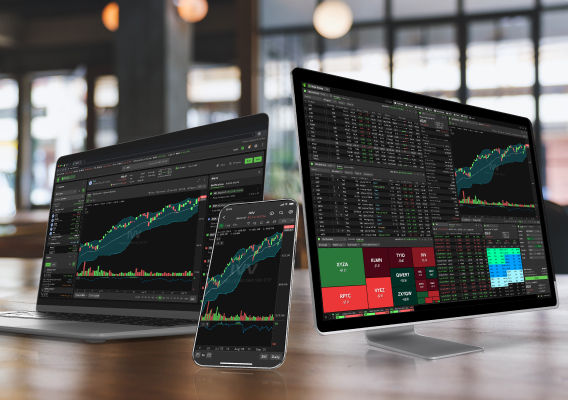
With our most powerful trading experience yet, you can track market activity from your phone, react on your desktop, and stay updated from any browser—in real time. Stay close to the trade with Fidelity Trader+.


Open a brokerage account

Limited-time offer: Zero contract fees for online options trades in Fidelity Trader+TM


Enjoy waived contract fees on options trades for 6 months when you try Fidelity Trader+ on desktop, mobile, or web. Registration required; terms and conditions may apply.


You must apply and be approved for options trading. Maximum of 100,000 waived contracts.

Our most powerful trading experience yet: All of the features. Zero cost.1

Trade confidently from your brokerage account with consistent real-time data, customized alerts, and efficient active-trading tools in our most powerful platforms yet—synced across your devices and powered by cutting-edge technology so you never miss a move.

Uniform enhanced charting


Single-step access to trades

Customizable tools and displays


Consistent tool preferences

Ability to save orders to trade later


Improved options trading


Fidelity Trader+TM Desktop

Access your downloadable, multi-monitor command center, rebuilt from our legacy platform, Active Trader Pro®, for full control, deeper insights, and faster active trading.


  • Advanced charting with drawing
  • Enhanced customization possibilities
  • Streamlined ticket for faster trading
  • Improved performance on Mac and PC


Fidelity Trader+TM Mobile

Enable our new active-trading mode in your Fidelity Investments® app for streamlined navigation and synced trade-activity preferences to take your trades on the go.


  • Portfolio/market news on home screen
  • Compact data views for less scrolling
  • Easier navigation to your top trading tasks
  • Consistent charting—from anywhere


Fidelity Trader+TM Web

Customize your dashboard—upgraded from your Trading Dashboard—as your strategy evolves for deeper portfolio analysis on any browser. No downloads, just decisions.


  • Trade from chart
  • Powerful charting with technical indicators
  • Automated alerts
  • Easy-access trade-action menu


Welcome to the next generation of trading

image shows how Trader+ app track multiple data streams without switching tabs in our new desktop app.

Track multiple data streams without switching tabs in our new desktop app—designed to display your layouts across up to 4 monitors.

Engineered for speed, precision, and total control


Improved performance

Multi-monitor views run natively on Windows and macOS


Enhanced charting

Power your decision-making with even more advanced chart indicators and drawing tools


Easy customization

Personalize your layouts, navigation menu, columns, tools, alerts, news, and more

Customization with less complexity


Customize your workspace, streamline your tools, and trade faster with enhanced layouts, smarter alerts, and the ability to save custom default trade settings designed to put you in control.

Level 2 quote data


Use rolling last prices and a synced Time and Sales tool to time your moves precisely.

New navigation with favorites


Pin your favorite tools to the top navigation bar for quick and easy access to your top tasks.

Link tools in an instant


Create up to 8 groups of linked tools across multiple workspaces to increase your efficiency.


Fidelity Trader+ Desktop learning resources


Discover the full potential of our advanced trading platform with these beginner-friendly resources.

Live events

Join our webinars to get live help from our professionals on Fidelity's Trading Strategy Desk®, with topics ranging from setup basics to our top tips and tricks.


Get event details

Desktop User Guide

Explore the refreshed guide—now easier to navigate, visually updated, and packed with quick answers. More enhancements coming soon.


View User Guide

Learning resources

Access how-to videos, insights from our trading professionals, and other educational resources for help optimizing your efficiency by mastering the advanced features our platform offers.


Visit our Learn page

Active traders get more with us: tiered benefits include dedicated support from trading specialists; a focus on execution quality with price improvement; and a powerful trading experience across all your devices.

Your new solution for every move

image shows Trader+ app mobile phone screenshots

Take your trading on the go with a new mode for your Fidelity Investments® app—designed for faster trading, interactive charting, and real-time insights. Stay connected to your portfolio—wherever you are.

Stay in sync with active trading that travels


Reimagined home screen

Easily access orders, activity, and news at login, for every step of your trading.


Compact views

Get faster analysis at a glance with more data, less whitespace, less scrolling.


Fewer steps

Enjoy quicker navigation to your top trading tasks because every second matters.

Transform how you trade


Customize your homepage to easily view your portfolio value, access open orders, get a quote, manage alerts, and view news to understand the day's market movement.

Streamlined navigation


Quickly access top trading tasks such as positions shortcuts, to find what you need faster.

Smarter, compact layout


Access more data with less scrolling—displays now featuring compact columns and 14+ rows.

Homepage with news


Instantly scan market/portfolio news to learn what's driving your performance at a glance.

Active-trading learning resources


Discover the full potential of our advanced trading platform with these beginner-friendly resources.

Live events

Join our webinars to get live help from our professionals on Fidelity's Trading Strategy Desk®, with topics ranging from setup basics to our top tips and tricks.


Get event details

Active-trading learning resources

Access how-to videos, insights from our trading professionals, and other educational resources for help optimizing your efficiency by mastering the advanced features our platform offers.


Visit our learning center

Active traders get more with us: tiered benefits include dedicated support from trading specialists; a focus on execution quality with price improvement; and a powerful trading experience across all your devices.

Move ahead of the market, wherever you are


Ready to trade smarter on the go? Just head to the Settings screen in your Fidelity Investments app to activate Fidelity Trader+ Mode.


Open a brokerage account

image shows Trader+ app web view screenshots

Open instant access to streaming market data and powerful portfolio analysis. Get streamlined trading software with the insights you need for smarter investing and trading online.

One screen to help you succeed


Gain deep insights

Leverage powerful research, news, and charts to power your trading.


Watch real-time market moves

Stay on top of the market with real-time live stock, ETF, and options data.


Easy access

Log in from your browser, wherever you are, no download needed.

Pursue ideas, place trades, track performance


Easily log in and start trading, with simplified customization of your live data displays and powerful tools.

Execute trades with ease


Leverage one-click access to enter trades, plan your exit strategies, and even manage alerts.

Analyze, identify, act, repeat


Review trade analyzer to estimate your trade's max gains, losses, and probability of profit.

Your watchlist. Your way.


Track potential opportunities with ease using real-time quotes and third-party analyst ratings.


Fidelity Trader+ Web learning resources


Discover the full potential of our advanced trading platform with these beginner-friendly resources.

Live events

Join our webinars to get live help from our professionals on Fidelity's Trading Strategy Desk®, with topics ranging from setup basics to our top tips and tricks.


Get event details

Fidelity Trader+ Web learning resources

Access how-to videos, insights from our trading professionals, and other educational resources for help optimizing your efficiency by mastering the advanced features our platform offers.


Visit our Learn page

Active traders get more with us: tiered benefits include dedicated support from trading specialists; a focus on execution quality with price improvement; and a powerful trading experience across all your devices.

View your brokerage portfolio in a whole new way


Open a brokerage account

  • How is Fidelity Trader+TM Web different from other Fidelity platforms?

    Fidelity Trader+ Web is a configurable, web-based platform that brings our most popular trading tools together into a single experience. It offers streaming data and advanced charting, while maintaining integration with your existing accounts and simplifying how you monitor and manage your investing activity. This new experience is suitable for a broad range of active investors, along with those unable to download software. Fidelity Trader+ Desktop is fully customizable, offers more features, and must be downloaded to a PC or Mac device.

  • How can I customize my layout in Fidelity Trader+ Web?

    You can customize your layout by moving and resizing various tool panels. For example, you can maximize your chart panel, hide your positions, or have them both show simultaneously. Learn more in our step-by-step guide.

  • What advanced charting features are available in Fidelity Trader+ Web?

    Fidelity Trader+ Web offers a wide range of charting tools and indicators, such as VWAP, Bollinger Bands, and moving averages to enhance your trading analysis. Automated pattern recognition helps you spot trends effortlessly, and you can save your charts to keep track of your strategies. You can also trade directly from the chart. Learn more in our charting guide.

  • Do I need to manually save my layout?

    Fidelity Trader+ Web automatically saves your layout and the location of your tool panels.

  • What are the system requirements?

    Fidelity Trader+ Web is a browser-based tool that has been optimized for screens larger than 1024 × 768 inches. It's not intended for use on mobile devices.